About Us
Welcome to SfdcIndia, where we specialize in empowering professionals with cutting-edge SfdcIndia training.
Contact nowContact Info
- CV Complex,
Above Bata Showroom,
Hastinapuram, BN Reddy,
Hyderabad, Telangana 500079. - +91-7097777111
- info@sfdcindia.com
Agentforce Sub Agent
Agentforce Sub Agent
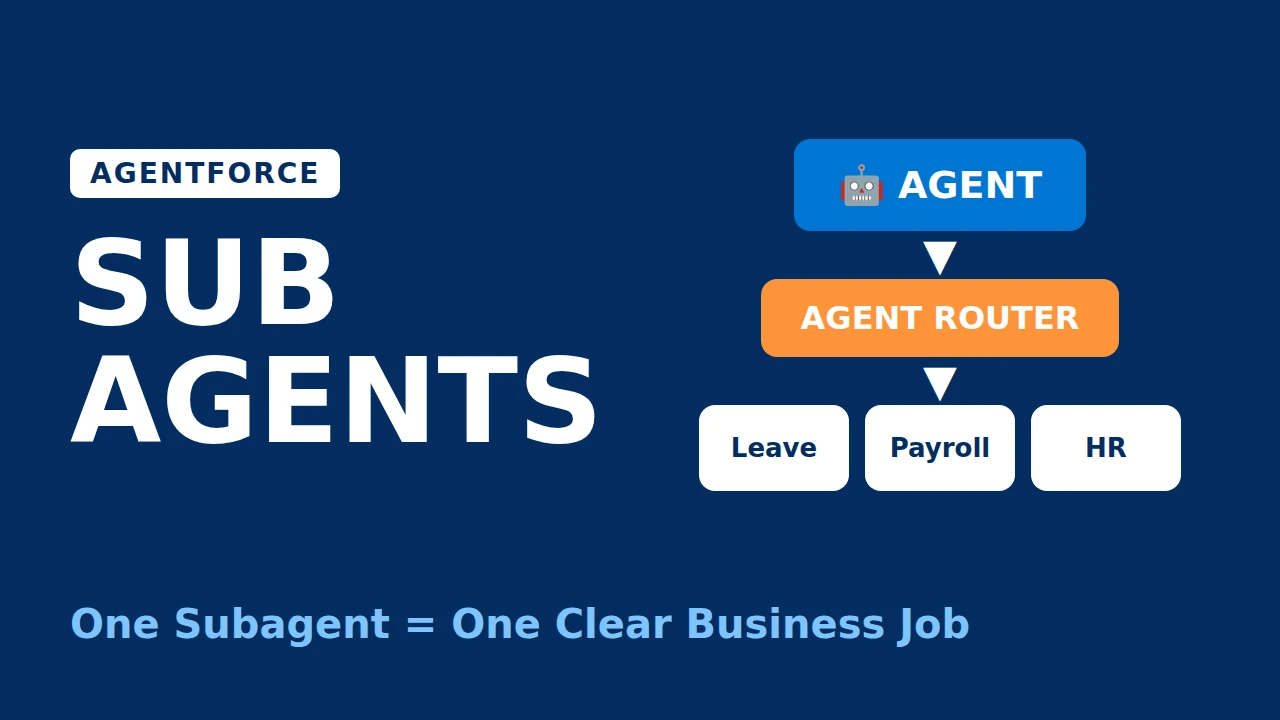
A subagent is one specific job that an Agentforce agent can do.
An agent has multiple subagents. Each subagent handles a specific type of work. Together, they decide what the agent can do.
If the user's request does not match any subagent, the agent may not know how to handle the request correctly.
Level 1 - Agent : The full assistant (Employee Agent, Service Agent, etc.). Holds the role, system messages, language settings and channels.
Level 2 - Subagents (Here AGENT ROUTER will pick the Related Sub Agent) : The jobs the agent can do.
Level 3 - Actions : The tools each subagent uses to do its job.
a) Name :A short, clear label for the job.
b) Description (Classification Description) : Tells the Agent Router WHEN to use this subagent.
This is the most important field. Routing depends mainly on it. A weak description sends requests to the wrong subagent.
c) Scope : What the subagent is allowed to do, and what it must NOT do.
d) Instructions : Rules for the subagent follows while working:
- business logic
- guardrails (what not to say or do)
- order of steps
- when to ask the user for more details
- tone and format of answers
e) Agent Actions : The actual action definitions owned by the subagent (Flow, Apex, Prompt Template, API, MCP tools).
--> Provided by Salesforce for common use cases. Examples: General FAQ, General CRM, etc..
--> You can add it from the Asset Library and customise the copied version.
--> Created by us for our own business requirement.
--> Created in Setup > Agentforce Assets > Subagents. (Library)
--> Created directly inside one agent in Agentforce Builder. (Local)
--> This is different from a normal subagent.
--> Here, another complete Agentforce Agent is connected to the current agent as a subagent.
--> Salesforce supports this through multi-agent orchestration.
Example :
--> Its a ready-made subagent created by Salesforce or a another partner.
--> We can install the package, bring the subagent into our org, and then add it to our agent from the Asset Library.
--> This is a special system/start subagent.
--> Its main responsibility is: Understand the user request → select the correct subagent.
--> Salesforce automatically adds an Agent Router when creating an agent.
--> This subagent belongs only to that particular agent/version.
We can create it in 3 ways:
- Canvas View – manually create the subagent.
- Script View – define the subagent through Agent Script.
- Ask AI assistance – describe what you need, and AI Assistance can generate the subagent and related actions for you.
--> This is useful when you want the same subagent to be available for multiple agents or agent versions. (Setup → Agentforce Assets → Subagents → New Subagent)
--> If we delete a Subagent from Agentforce Assets, the Subagent version already added to an Agent will still remain and continue to work in that Agent.
--> Why? When you add a subagent from Agentforce Assets / Asset Library to an agent, Salesforce creates an independent copy inside that agent version. So deleting the original asset does not delete the copies already used by agents.
--> If we update a Subagent in Agentforce Assets, it will not automatically update the Subagent already added to an Agent, Because The Subagent inside the Agent is treated as a separate copy/version.
--> Changes made to the original Subagent in Agentforce Assets are not automatically synced to existing Agents.
--> To use the latest changes, open the Agent in Agentforce Builder, Add the updated Subagent again from the Asset Library / Agentforce Assets.
Order Management
Handles questions about existing orders, including order status,
delivery date, and order cancellation. Use when the user mentions
an order, order number, shipment, delivery, or wants to cancel.
In scope: order status, delivery tracking, cancelling orders that
are not yet shipped.
Out of scope: refunds, returns, product recommendations,
billing disputes.
- Always ask for the order number if it is not provided.
- Use "Get Order by Number" to fetch order details.
- If status is "Shipped", do not allow cancellation; explain why.
- Before cancelling, confirm with the user.
- Never share payment card details.
- Get Order by Number (Flow)
- Cancel Order (Apex)
- Size limits: Too many Subagents can reduce the Agent performance.(Recommended: around 10 Subagents per Agent and around 10 Actions per Subagent.)
- Actions have a time limit. If a Flow or Apex action takes longer than 60 seconds, it fails.
- Asset updates do not automatically sync : If a Subagent is added from Agentforce Assets, later changes to the original asset do not automatically update the Agent copy.
- Some advanced features require Script View. Ex : Custom Lightning Types for Action inputs/outputs are not supported in Canvas View.
- Wrong routing: similar descriptions confuse the agent.
- Keep "one clear job" for each Subagent.
- Give the Subagent a "clear name and description".
- Write "Clear and specific instructions".
- Avoid creating multiple Subagents with "similar responsibilities".
- Add only the "required Actions" to each Subagent.
- Keep the number of Subagents and Actions "manageable".
- Make sure required "permissions and data access" are available.
- Use clear routing conditions so the "Agent Router" selects the correct Subagent.
- Test each Subagent with "different user questions".
- Re-test after changing instructions, Actions, or assets.